'FAQs', "link" => '')
);
$page->add_breadcrumbs($breadcrumbs);
$page->assign("title", "FAQs - Camping & Campsites");
$page->assign("meta_description", "Camping & Campsites frequently asked questions");
$page->sub_template("menu.tpl", "menu");
$page->assign("faq_link", "menu_selected");
$page->assign("rel_path", './');
$content = '';
$content .= 'Frequently Asked Questions
';
$content .= 'FAQs for users
How do I use the campsite finder?
How can I bookmark my favourite campsites?
What do I get if I sign up?
How do I contact someone if I have problems or suggestions?
';
$content .= '
FAQs for campsite owners
How do I edit my campsite\'s details?
How can I have photos on my campsite listing?
What are the benefits of having a premium listing?
Why does my request to add a campsite have to be approved first for standard listings?
';
$content .= '
FAQs for users
How do I use the campsite finder?
Our campsite finder is a google maps based application. Our entire database of around 3500 campsites is loaded into the map. You can easily look anywhere on the map
by typing a location into the box below the map and clicking \'Go!\', you can also just drag the map. Each pin is a campsite, clicking on a pin shows the campsite name and the option to
view all the details for the campsite.
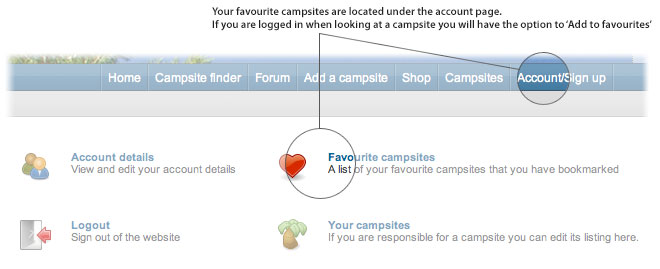
How can I bookmark my favourite campsites?
If you are logged in to the website you will see a \'Add to favourites\' button when looking at a campsite which will bookmark it. To view your favourites just go to the favourites section
under your account.
What do I get if I sign up?
Signing up allows you to make posts on the forum, submit reviews of campsites you\'ve visited and keep a list of favourite campsites. It\'s completely free and only
requires you to pick a username and a password.
How do I contact someone if I have problems or suggestions?
Use the details on the contact page to submit questions, help requests, suggestions and anything else you would like to contact us
about.
FAQs for campsite owners
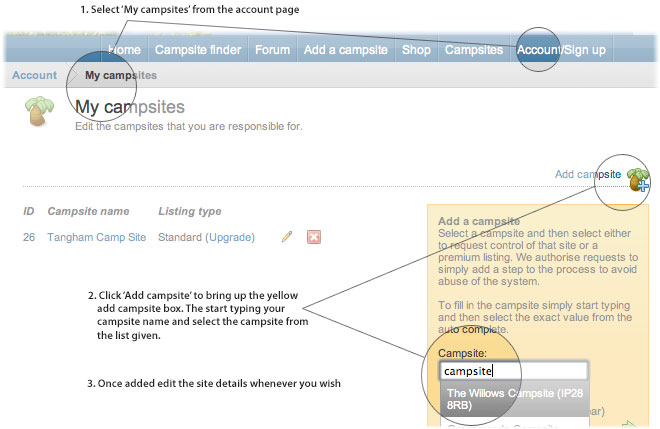
How do I edit my site details?
The edit area for editing campsites is in the account area. Under \'My campsites\' is the list of your campsites. There is a button on the right hand
side of the page to add a site. This will bring up a box to allow you to select a site and submit a control request or get a premium listing. Once you have added the campsite
you can edit all the campsite\'s details.
How can I have photos on my campsite listing?
You can have 10 photos up to 600 x 450 pixels big with a premium listing.
What are the benefits of having a premium listing?
With a premium listing your site will come above all the standard sites in any search results or campsite listings. It will also have a premium icon to
help it stand out more. On the campsite finder it will also have a different colour pin to help it stand out. You will of course also be able to add up to 10 large photos
to the listing to help sell your campsite to potential visitors.
Why does my request to add a campsite have to be approved first for standard listings?
This is simply to stop just anyone from easily changing any campsite details for fun or otherwise. It helps us ensure that campsite owners are changing the details and protects
listings from abuse.
';
$content .= '
';
$content .= '
'.google_ads("horiz_links").'
';
$page->assign("content", $content);
$page->display();
?>